
Git(Hub) 2021 update
11/14/25About 1 min
Git(Hub) 2021 update
- ...
(Re)configure Git on your device
$ git config --global user.name "yourName"
$ git config --global user.email "yourThomasMoreEmail"
$ git config --global core.editor notepad
Generate a new SSH key
- Open Git Bash in a random folder and add this command
(Replace yourThomasMoreEmail with your Thomas More mail address)
mkdir -p ~/.ssh && ssh-keygen -t ed25519 -f ~/.ssh/github -C "yourThomasMoreEmail"- Click several times
enter(on line 3 and on line 4) until the process is finished
mkdir -p ~/.ssh && ssh-keygen -t ed25519 -f ~/.ssh/github -C "yourThomasMoreEmail"
Generating public/private ed25519 key pair.
Enter passphrase (empty for no passphrase):
Enter same passphrase again:
Your identification has been saved in github
Your public key has been saved in github.pub
The key fingerprint is:
SHA256:6Ngt1IEd345k+ijj46jOijUxIqQ8e1/kts313GFjY68 [email protected]
The key's randomart image is:
+--[ED25519 256]--+
|        .        |
|       o o .     |
| .    . o + .    |
|+      o = o     |
|+oo   o.S . .    |
|..oo =o. o       |
| .o.. *+o ..   B |
|.o...o+++ . o = =|
|oo+..ooo o   oEo.|
+----[SHA256]-----+
Add your SSH key to the config file
- Open (or create) a config file
$ touch ~/.ssh/config && notepad ~/.ssh/config- Add this to the config file
Host github.com
  HostName github.com
  User git
  IdentityFile ~/.ssh/github
  AddKeysToAgent yes
Add your public SSH key to GitHub
- Copy the SSH public key to your clipboard
$ clip < ~/.ssh/github.pub- Go to https://github.com/settings/keys
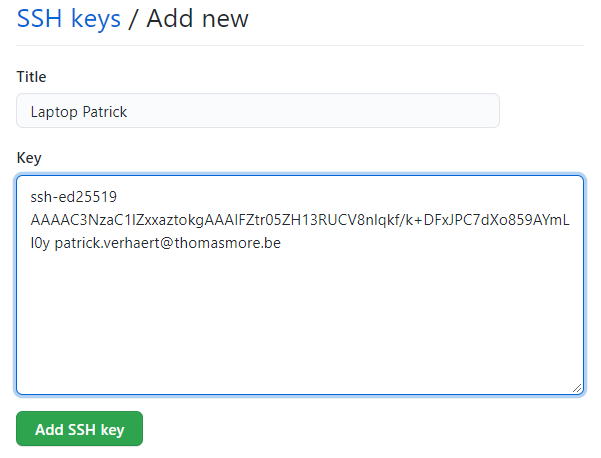
- Click on New SSH key
- enter a name for the key (e.g. Laptop YourName)
- and paste the copied key and click on Add SSH key
Test your connection with GitHub
- Open a new Git Bash window and execute this command:
$ ssh -T github.com
Hi userName! You've successfully authenticated, but GitHub does not provide shell access.
Update existing repo to use SSH
- Check how your repo is set up:
$ git remote get-url origin- If this shows a URL like this, you have to update the URL
https://github.com/username/repoName.git- Update your (old) URL to use SSH instead:
$ git remote set-url origin [email protected]:username/repoName.git- Check how your repo again:
$ git remote get-url origin- If the result is like this, you're ready to go:
[email protected]:username/repoName.git